Campaign & Placement Management
Company
Primis Video Discovery
Product
Configurations Platform
Year
2025
Role
Sole Product Designer
The Problem
The campaign management table is the platform’s main workspace: ops teams use it to configure, monitor, and optimize campaigns, placements, and domains. It had grown for years without structure, leaving nested configurations, fragmented workflows, and bulk actions where one wrong value (a floor price, a budget) could cost real money.
Impact
Campaign configuration time dropped 24% (Mixpanel).
What I learned
- 60% of Campaigns/Placements support tickets came from misunderstanding table filters, column options, and export behavior. I found this by analyzing support logs. The problem wasn’t missing features. It was a UI users couldn’t read.
- Users didn’t share vocabulary. Through the platform’s discovery program (8 users across ops, publishers, syndicators, and advertisers), I mapped how each role defined targets, dates, and segments, and unified terms like “placement” versus “campaign.”
- Bulk actions need recoverable states. Users were afraid of irreversible mistakes.
I also audited bulk edit and column patterns in GAM, PubMatic, and Magnite, and mapped a day in the life of the primary persona: checking changes in the morning, justifying decisions to partners at midday, and testing new placements in the afternoon.
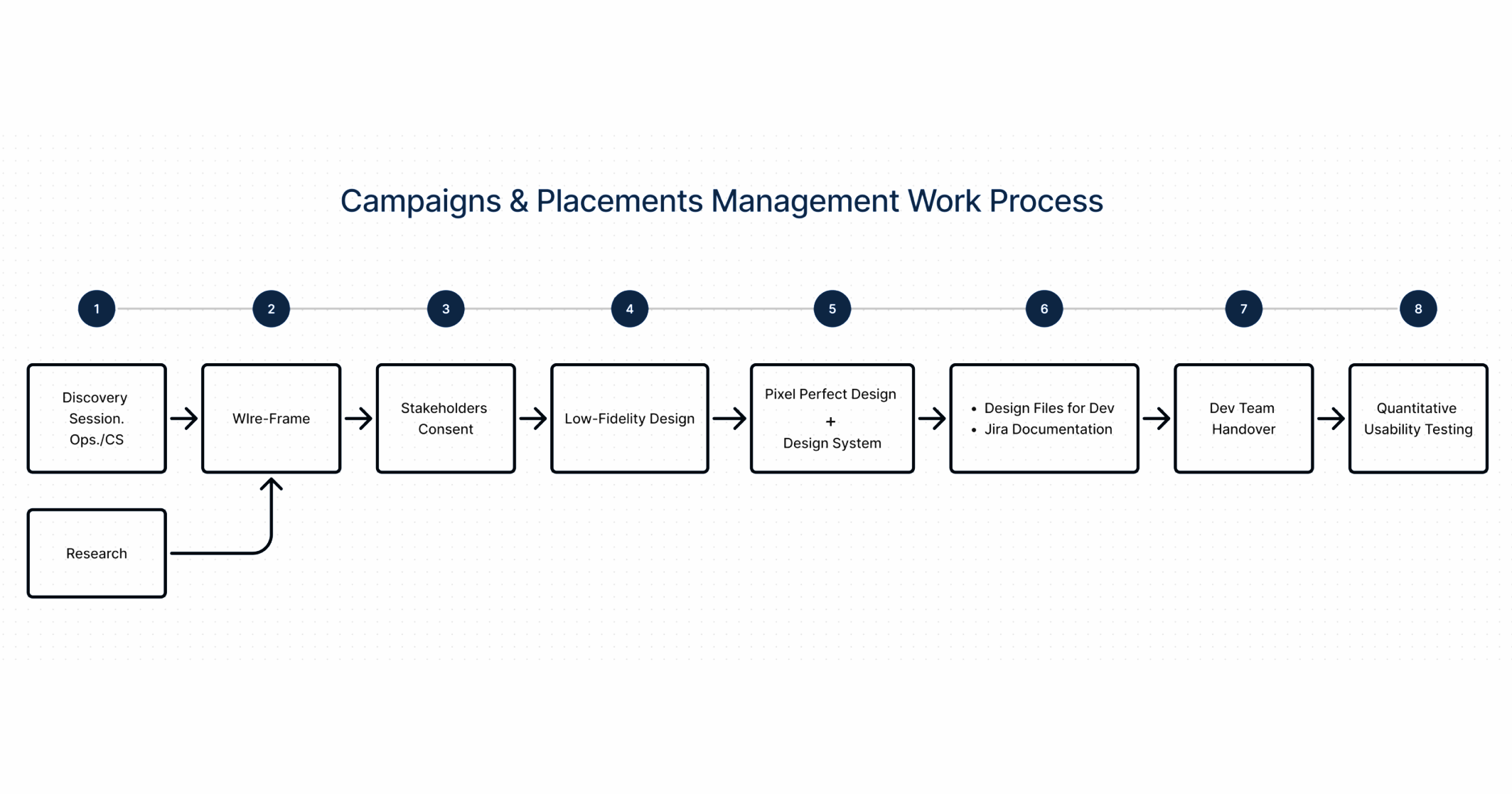
The Work Process
Key Decisions
One view from overview to action.
The table brings key metrics, configuration states, and status indicators for campaigns, placements, and domains into a single view. Ops users scan performance, spot issues, and act on several campaigns at once without leaving the table or losing context.
Design the table around the ops day.
Journey mapping showed when users return to the table: checking what changed in the morning, pulling screenshots and quick reports for partners at midday, and editing poor performers and scheduling changes in the afternoon. The table’s structure follows those three moments.
Fix what generated the tickets.
I redesigned the three things behind those tickets: clearer filter labels and states, a column picker whose presets are saved in the user’s browser, and export to CSV or Google Sheets.
Show the blast radius of bulk changes.
Bulk actions show exactly which entities are affected, add a confirmation step, and warn before overriding sensitive values like floor prices, budgets, and limits.
Keep power without clutter.
Simplified defaults for everyday work, with advanced controls still one step away for power users, so the table stays dense with data but readable.
Ideation Wire-Frame
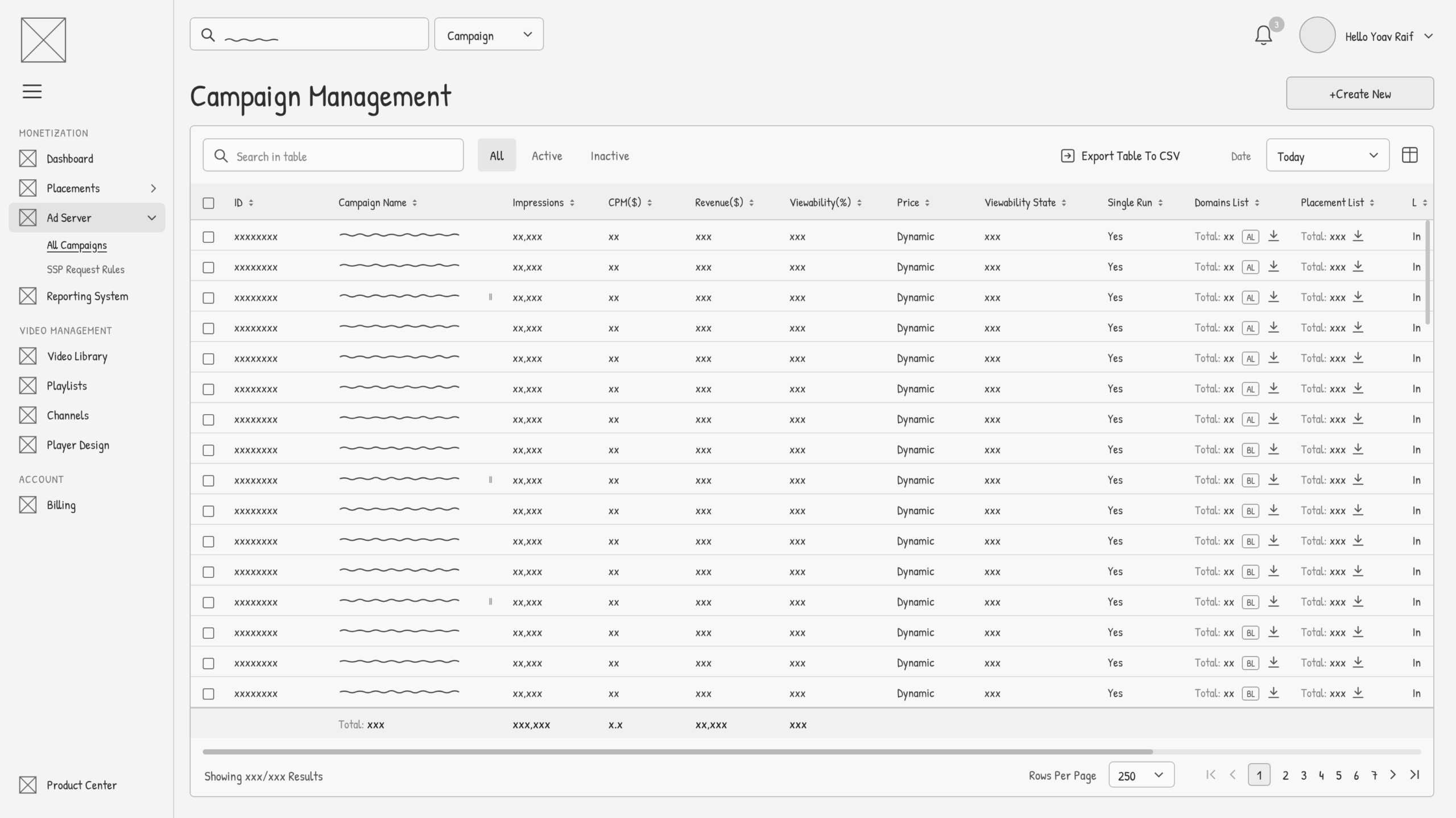
Final Campaign Management Table
Create Campaign Form
The create-campaign form carried the same risk as the table: one wrong floor price costs money. I ordered the sections the way ops build a campaign (setup, then pricing and delivery, then targeting and advanced controls), and extended MUI fields with inline hints, helper text and unit suffixes, so the rules sit where the value is entered. Submit stays blocked until every required field is filled, and a failed submit scrolls straight to the first missing field. I tested the form with ops users before handoff.