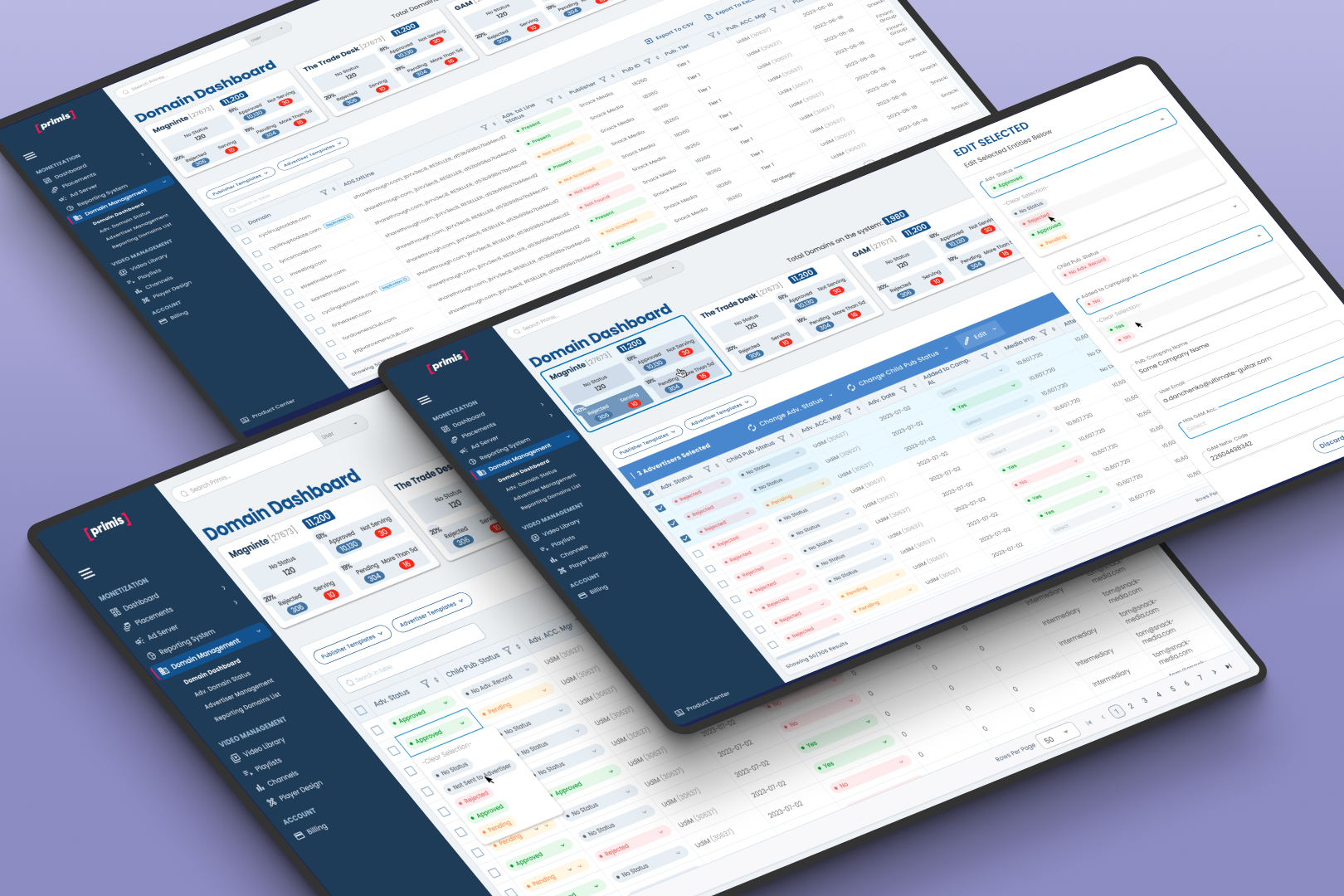
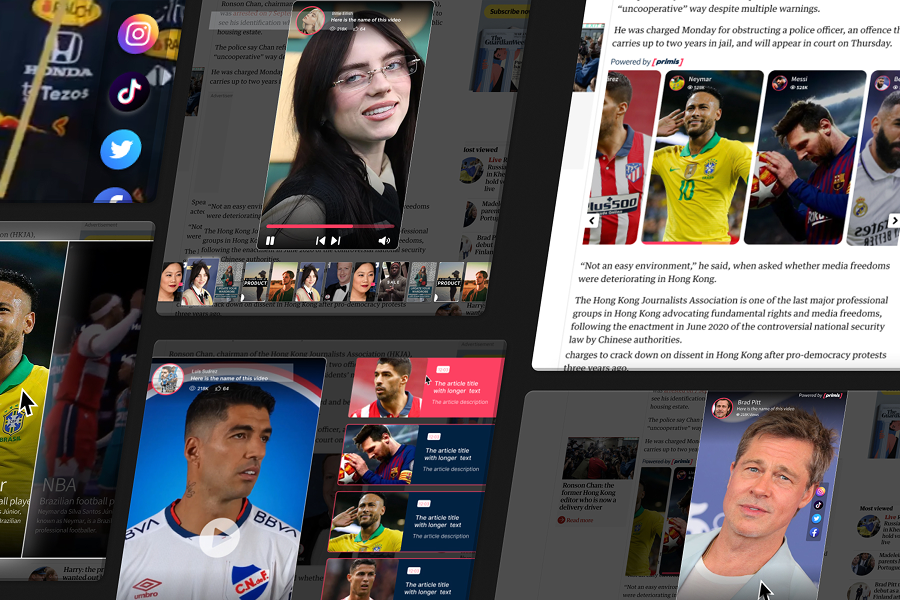
Designing the Foundation of a Data-Heavy Ad-Tech Platform Where Data, Roles, and Workflows Intersect
This project laid the design foundation for the entire platform – shaping how data, navigation, and workflows are structured across all product areas.
Different user roles were forced to operate within the same interface, creating inefficiencies, cognitive overload, and reduced productivity across the platform.
In this project, I defined the core system elements that enable scalable product growth, ensuring consistency, clarity, and efficient data access across different user roles.
Company
Primis Video Discovery
Product
A Video Ad-Tech Configurations Platform
Feature
Data-heavy dashboards
Role-based workflows
Real-time performance analysis
Year
2025
About Primis
Purpose
Primis is an Ad-Tech data-intensive platform where users manage complex campaign logic and make fast, high-impact decisions based on real-time data.
Designing a data-heavy platform used by publishers and internal teams to manage large-scale advertising operations and make fast, high-stakes decisions across complex, real-time datasets
About the Product
The platform is a data-heavy Ad-Tech system used by operations teams to manage domains, campaigns, and monetization workflows across multiple SSPs. It supports multiple user roles with different responsibilities, requiring tailored experiences, clear navigation, and efficient access to relevant data.
The Feature
This project focused on designing a data-intensive platform where users must manage publishers (clients), complex campaign operations, and make fast, high-impact decisions based on real-time data reflected on the reporting dashboard.
Users needed to manage complex campaign configurations, but existing workflows were fragmented and error-prone.
Impact
Refined data visualization and UI layout structure to make complex datasets instantly scannable and easier to act upon.
- Improved efficiency for different user roles by reducing irrelevant data and actions.
- Increased focus and productivity across operational workflows.
- Reduced time to insight by 22% – The time it takes to access critical information for decision-making.
Challenges
Each role required a different balance between overview, context, and actionability – which directly shaped the information hierarchy.
Different user roles required access to the same system, but with vastly different priorities, workflows, and levels of complexity – creating friction, inefficiency, and cognitive overload.
Users were required to work across fragmented views, making it difficult to understand performance holistically or act quickly on insights.
Different user roles had different needs, but the system lacked clear differentiation in how data was presented and prioritized.
As a result, users experienced high cognitive load, slower decision-making, and difficulty identifying actionable insights within complex datasets.
As the product expanded, this made it increasingly difficult to maintain consistency and scale new features without introducing additional complexity.
A key insight was that different user roles required entirely different mental models and business requirements, not just different data view.
My Role in this Project
⸺ Qualitative Research ⸺
Gathered user insights to drive evidence-based design.
⸺ Sketch Visualization ⸺
Defined the visual direction.
⸺ Rapid Prototyping ⸺
Validated ideas through testing.
⸺ Product Packaging ⸺
Crafted the unboxing experience.
⸺ Development Handoff ⸺
Ensured technical feasibility.
⸺ Usability Testing ⸺
Identified friction points through direct user feedback.
Design Leadership & Ownership
- Led the end-to-end design of role-based dashboard experiences across a complex, multi-entity platform.
- Defined scalable UX patterns for role-based layouts and personalization at scale.
- Influenced product decisions by aligning user needs, business goals, and system constraints.
Key Decisions & Trade-offs
- Balanced role-based customization with platform-wide consistency to prevent fragmentation.
- Defined role-based defaults while allowing user-level customization.
- Designed a scalable role-based framework that supports diverse user needs without fragmenting the product experience.
User-Role UI Layouts – Vision, Ideation & Creation
Designed a scalable framework to support multiple roles without fragmenting the product experience.
Role-based layouts and navigation structures driven by the platform’s permission model, supporting six distinct user roles. Each role is presented with a tailored interface that dynamically controls data visibility, available actions, and configuration options according to its permissions, ensuring clarity, security, and operational efficiency across the platform.
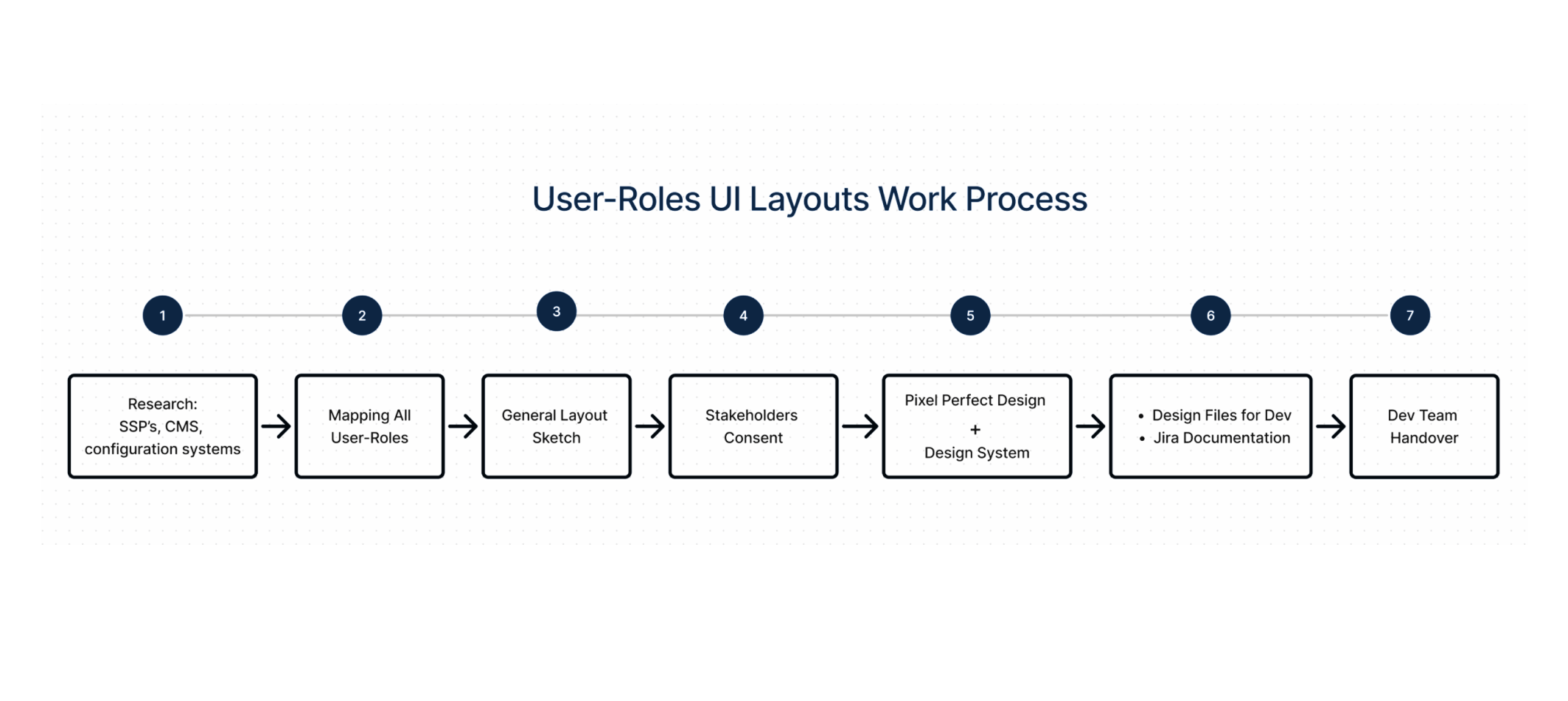
Research
User research & stakeholder alignment
Conducted interviews with 8 operational users across global ops, publishers, syndicators, and advertiser teams to map pain points linked to platform complexity.Identified workflows that span multiple roles, e.g., publisher dashboards vs advertiser data.Mapped feature conflicts where global controls conflict with the User Role attributes.
Competitive & ecosystem analysis
Audited 6 industry ad‑tech consoles (PubMatic UI, Magnite, Google Ad Manager, Open X, Connatix, and Teads) to catalogue navigation patterns for multi‑role environments.Benchmarked role‑aware navigation systems (e.g., AWS IAM console, Zendesk support roles) to find proven patterns for progressive disclosure of controls.
Insights
Users struggled to quickly identify relevant signals within large volumes of data, leading to slower decision-making and increased reliance on manual checks.
Impact
Improved decision-making speed and reduced operational friction by 22%.
Reduced cognitive load across key workflows.
Enabled users to manage complex configurations with fewer errors.
Solution
Unified layout system for scalability
Defined a consistent layout structure that serves as the backbone for all product surfaces, enabling predictable interactions and faster development of new features across the platform.
Role-based experience architecture
Designed a flexible system that adapts content, navigation, and data visibility based on user roles – reducing noise and allowing users to focus only on relevant information.
Scalable navigation logic
Created a structured navigation model that supports complex workflows and growing product areas, ensuring users can efficiently move between tasks without losing context.
Data prioritization & visibility
Reduced time to insight and improved decision efficiency.
Design system foundations (visual + interaction language)
Defined core visual and interaction patterns that ensure consistency across all product areas and support scalable development.
Cross-product consistency
Ensured that all product areas follow the same interaction patterns and visual principles, reducing learning curves and improving overall usability.
Enabling future product growth
Built a flexible foundation that allows new features and workflows to be added without breaking existing structures, supporting long-term scalability.
Outcome
The new foundation improved consistency, clarity, and scalability across the entire platform.
Users were able to access relevant data faster, navigate more efficiently, and operate with reduced cognitive load.
The system enabled faster development of new features while maintaining a consistent experience across all product areas.
As a result, the platform became more scalable, easier to extend, and more reliable for day-to-day operations.
This foundation enabled the product to scale across multiple user roles, features, and workflows without compromising consistency or usability.
Together, these solutions transformed fragmented domain data into a structured, actionable system that supports efficient monitoring and confident decision-making at scale.
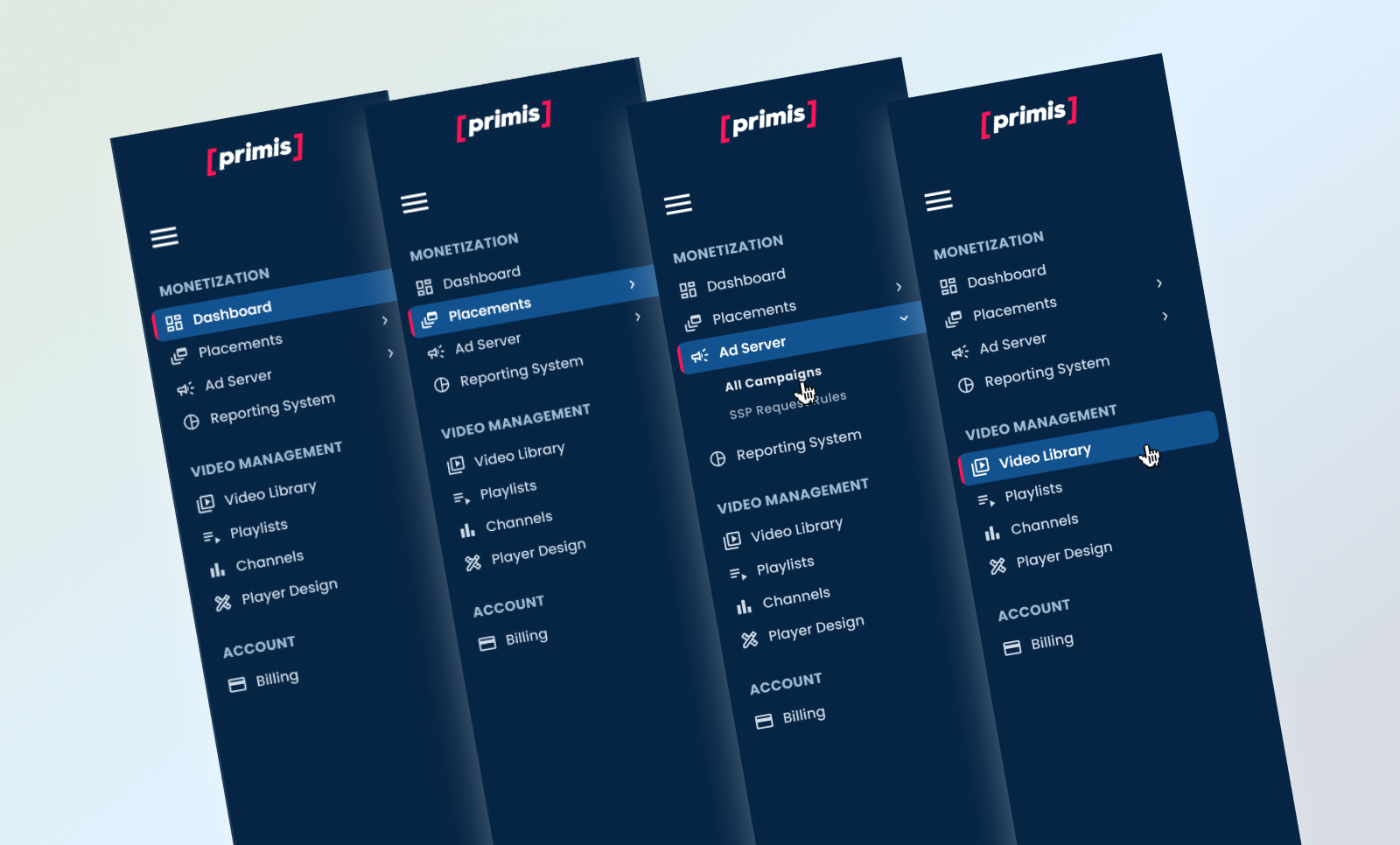
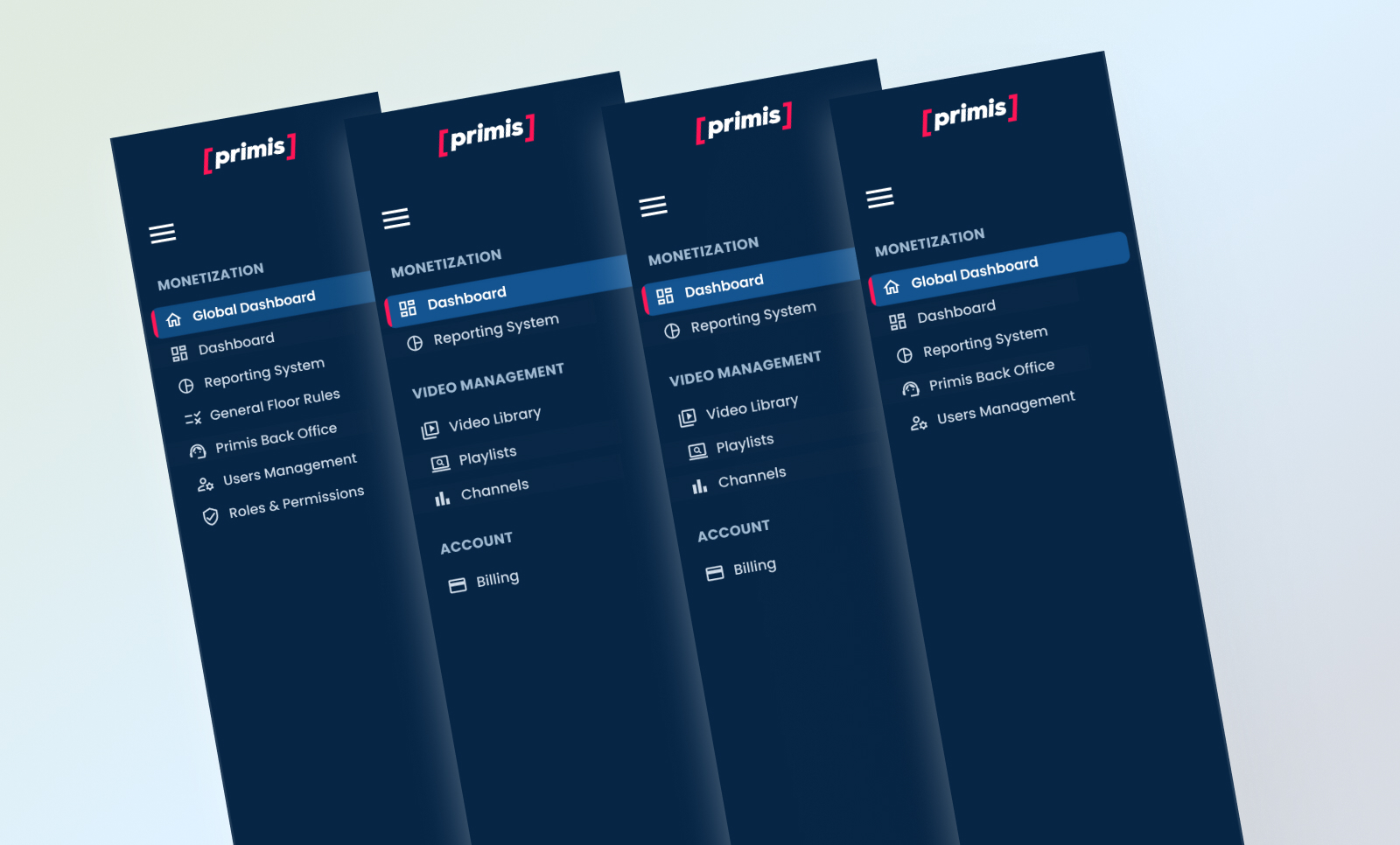
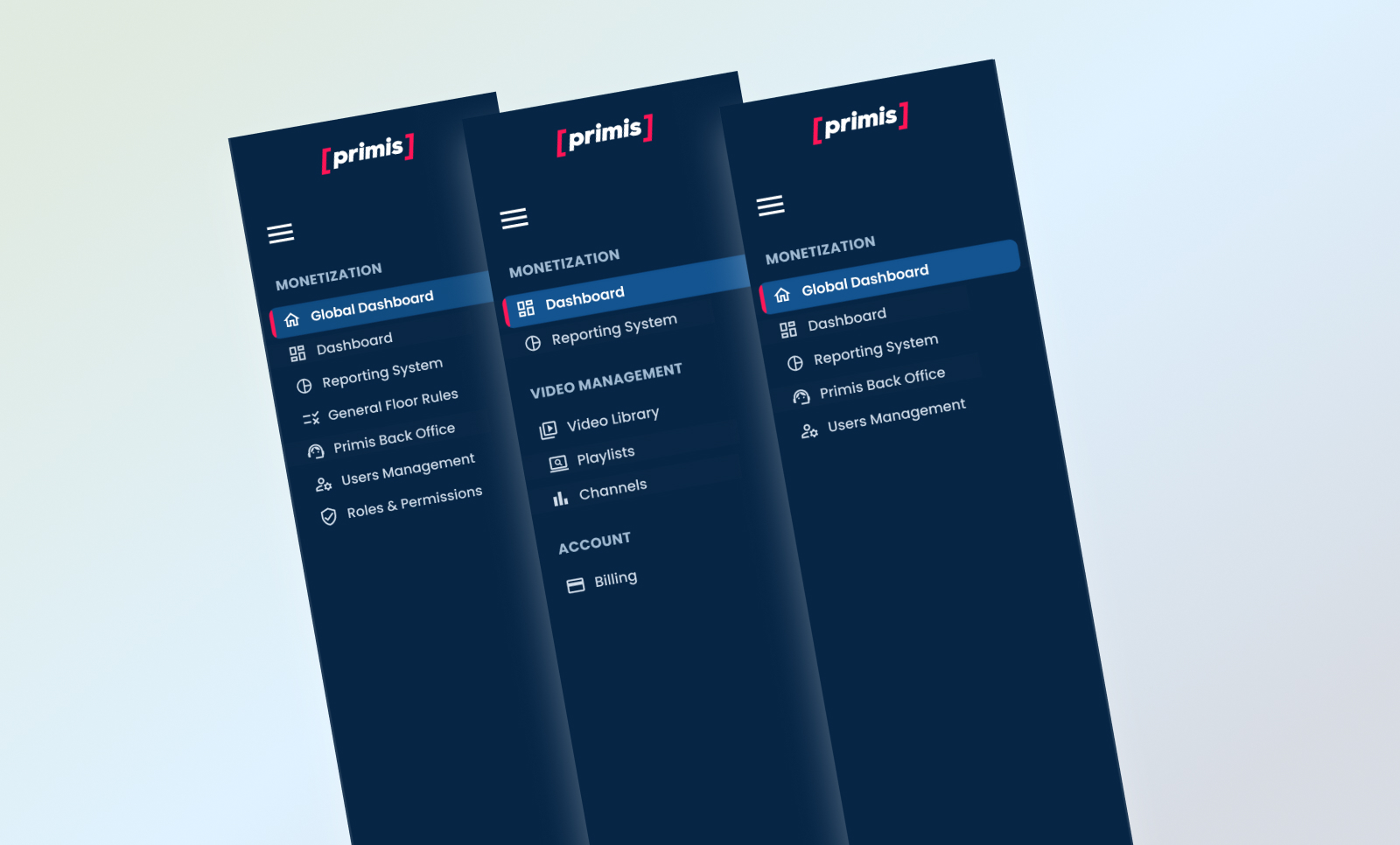
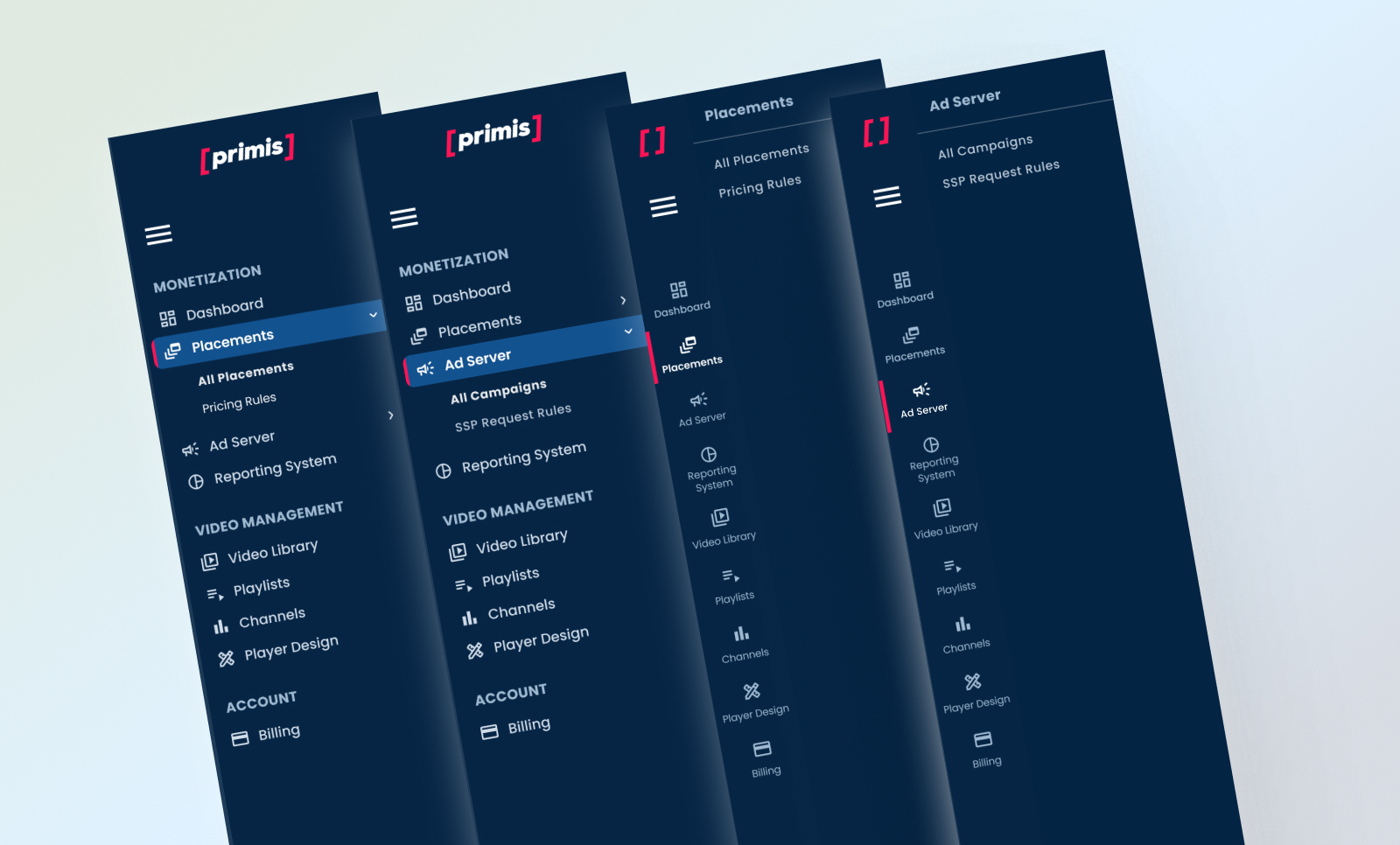
Various User-Roles UI Layouts
Colors & Graphic Language
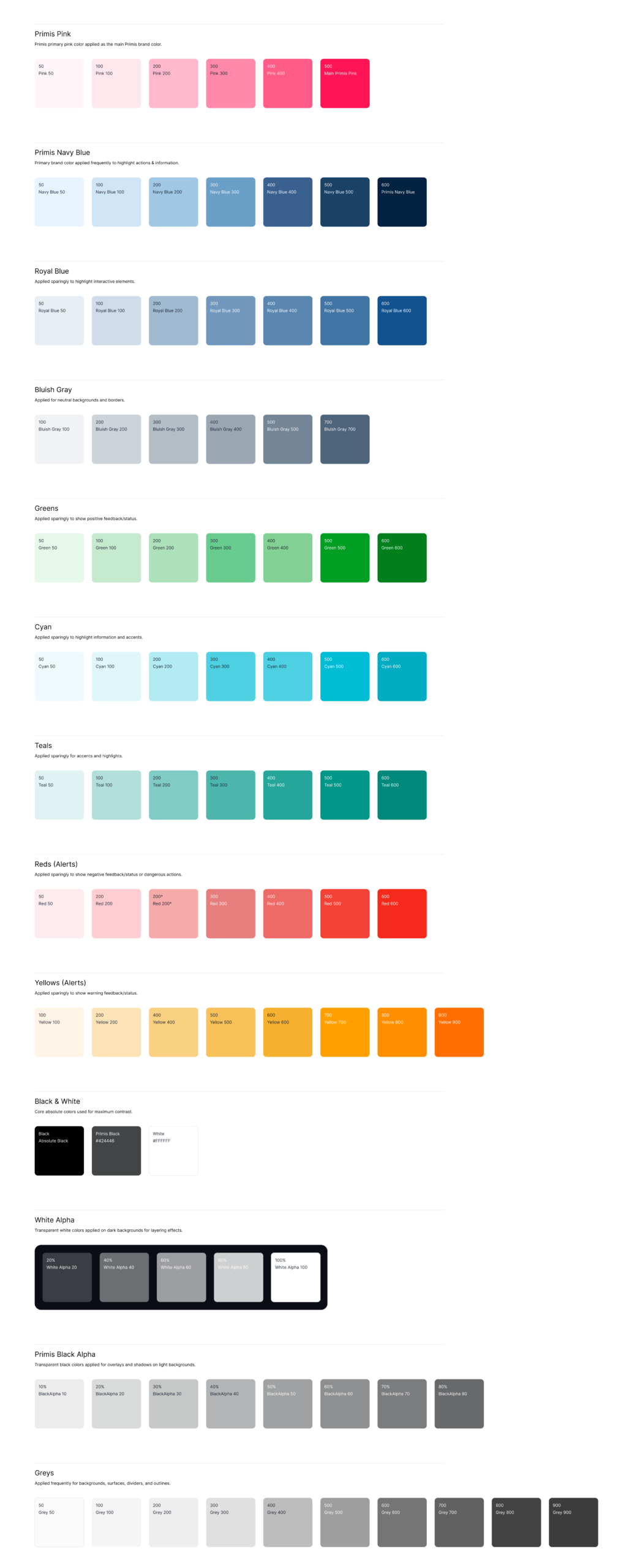
To support a scalable, data-heavy platform, I evolved Primis’s limited visual language into a structured design system that could support complex dashboards and future product growth.
I defined a semantic color system with clear roles for status, hierarchy, and interaction – enabling faster data interpretation and more consistent experiences across the platform.
I also established a unified iconography approach using MUI components, ensuring consistency, reusability, and efficient collaboration with engineering.
Primis Extended Color Palette
Global Dashboard – Vision, Ideation & Creation
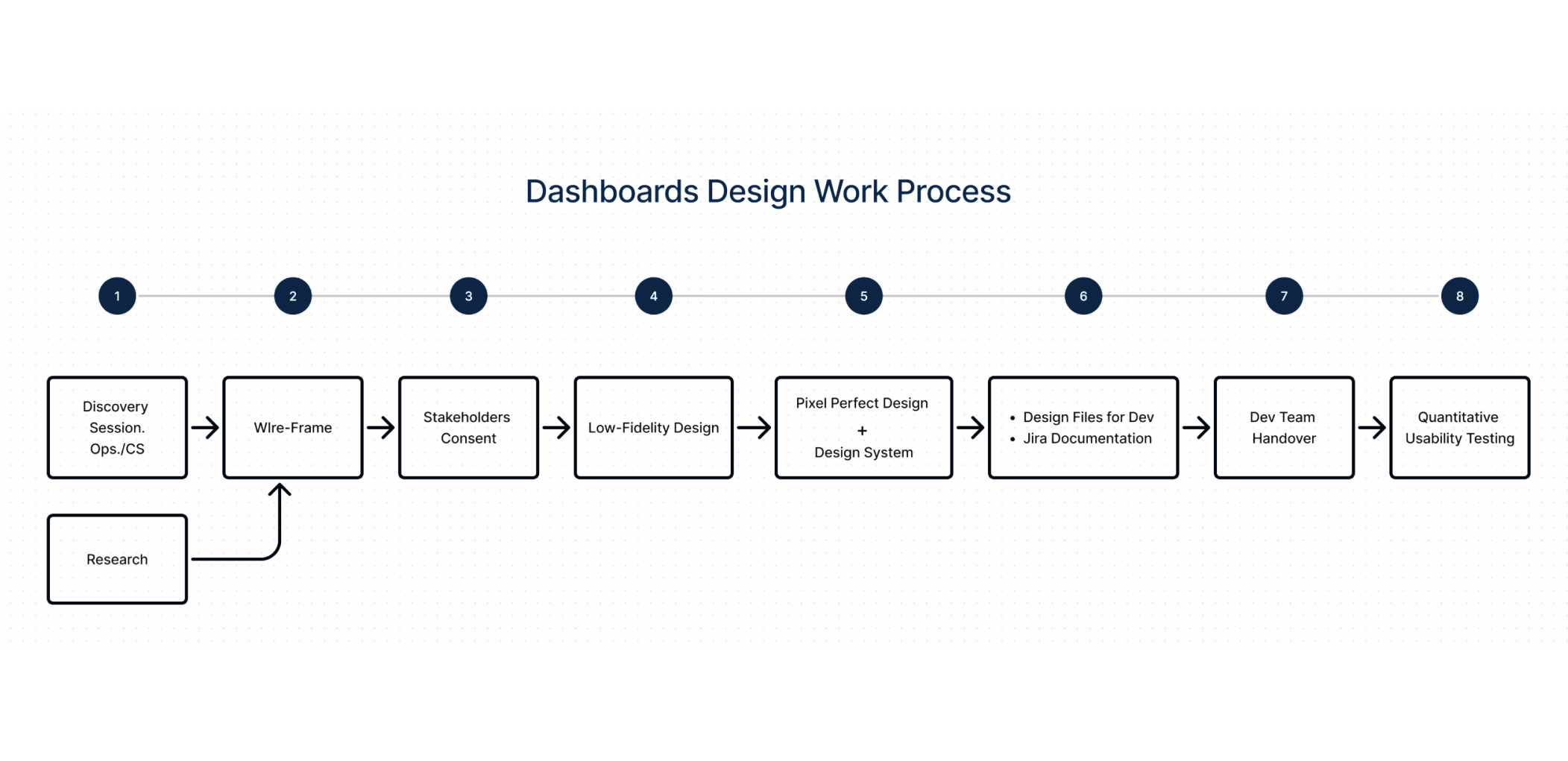
Research
1) Stakeholder & Business Interviews
Interviewed 8 internal users across Ops, Product, Support, and Analytics to define not only what metrics they want, but why a central dashboard matters to them.Clarified business outcomes: reduce time to insight, increase operational efficiency, and unify KPIs across modules in one consistent interface.Mapped internal strategic goals (revenue growth, publisher retention, error reduction) to measurable dashboard outputs.
2) Competitive & Ecosystem Benchmarking
Audited 8 dashboards in ad‑tech and data ops tools (SSPs, BI tools, monetization platforms) to identify common data patterns and layout conventions that support fast insight extraction.Measured how leading products handle filtering, cross‑module navigation, and multiple data slices (e.g., periods, role‑scoped KPIs).
3) Cognitive & Workflow Mapping
Ran task analysis sessions where users completed core tasks (find revenue trend, change period, compare publisher vs global) using the legacy interface.Identified key pain points: context loss when navigating between modules, unclear period selectors, and ambiguous KPI definitions.
Core insights: Users need control of context (periods, slices, role scope) before they need detail.Dashboard adoption rises when navigation and search are predictable and persistent.Visual hierarchy must match decision urgency (what’s most important now) vs exploration (drill‑downs).
What this research informed: Use of a universal time selector with presets + custom range, placed persistently in the top bar.Centralized global search that returns results across entities (publishers, campaigns, placements).Data hierarchy and visuals that reflect high‑level KPIs first, drill‑down second.
Solution
The goal was to improve decision-making efficiency and reduce friction in managing large-scale advertising operations.
A Global Operations dashboards that surface the most relevant data per publisher, enabling faster and more confident decision-making based on data.
I designed the Global Dashboard as the central operational entry point of the platform, consolidating navigation, search, and key metrics into a structured workspace that enables faster orientation and decision-making.
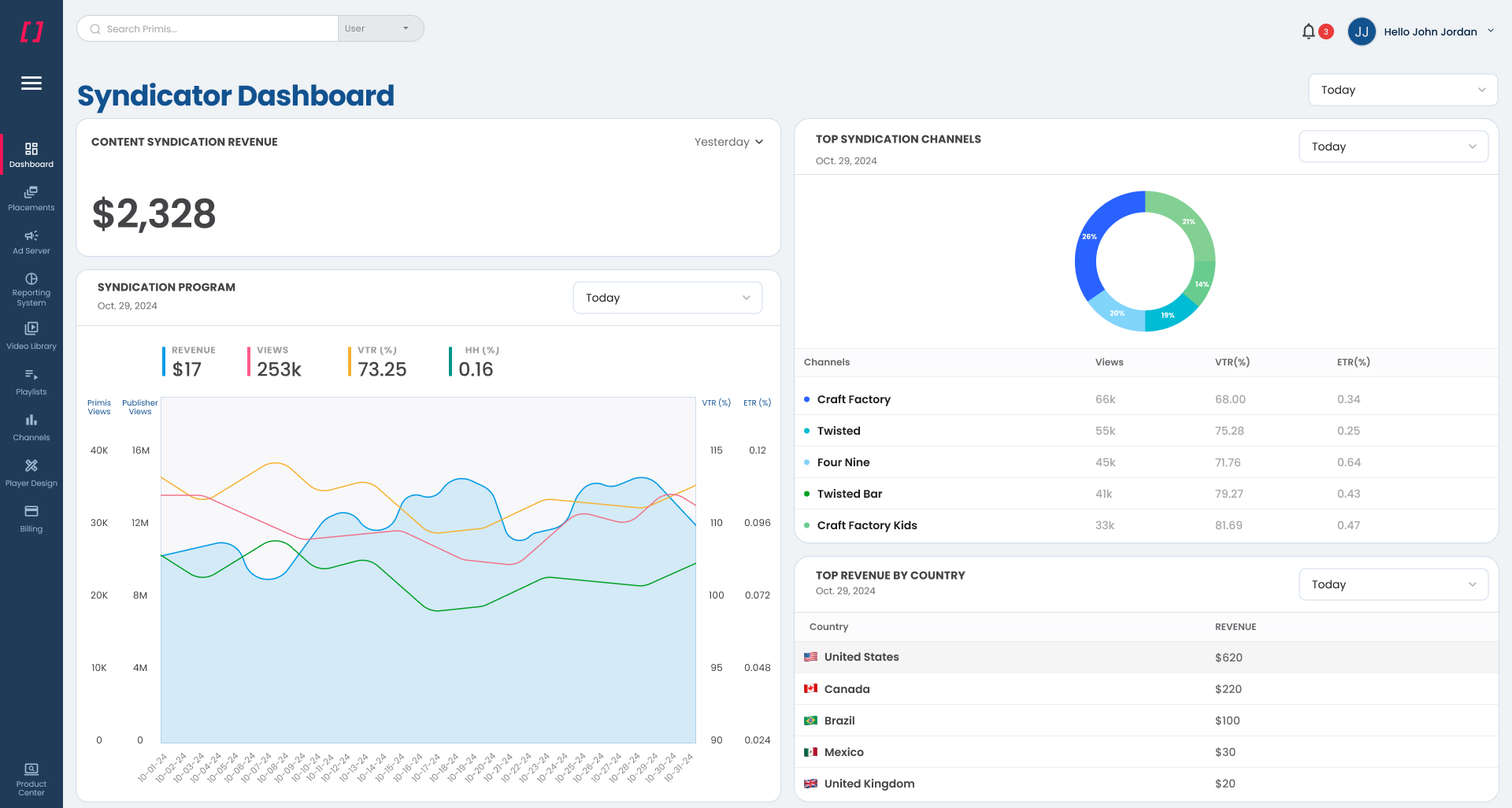
Visually, I used the extended UI palette in the dashboard layer, with Primis colors, iconography, and layout patterns to create a new, refined look & feel across all dashboards. The dashboard provides users with a clear overview of key operations, frequent actions, and system activity, supporting fast orientation, seamless movement across the platform, and efficient handling of large-scale workflows.
The chart legend was designed as an interactive control layer rather than a passive indicator. Users can dynamically add or remove metrics directly from the legend, instantly updating the visualization. Each selected metric is rendered with its own Y-axis scaling, allowing accurate comparison between values with different ranges without compromising readability.
The graph width is dynamic and expands/shrinks according to the metrics added by users through the dynamic legend selection.
Impact
Improved clarity in complex workflows.
Reduced cognitive load across key user journeys.
Enabled faster and more confident decision-making.
Reduced operational friction in publisher account management.
Ideation Wire-Frame
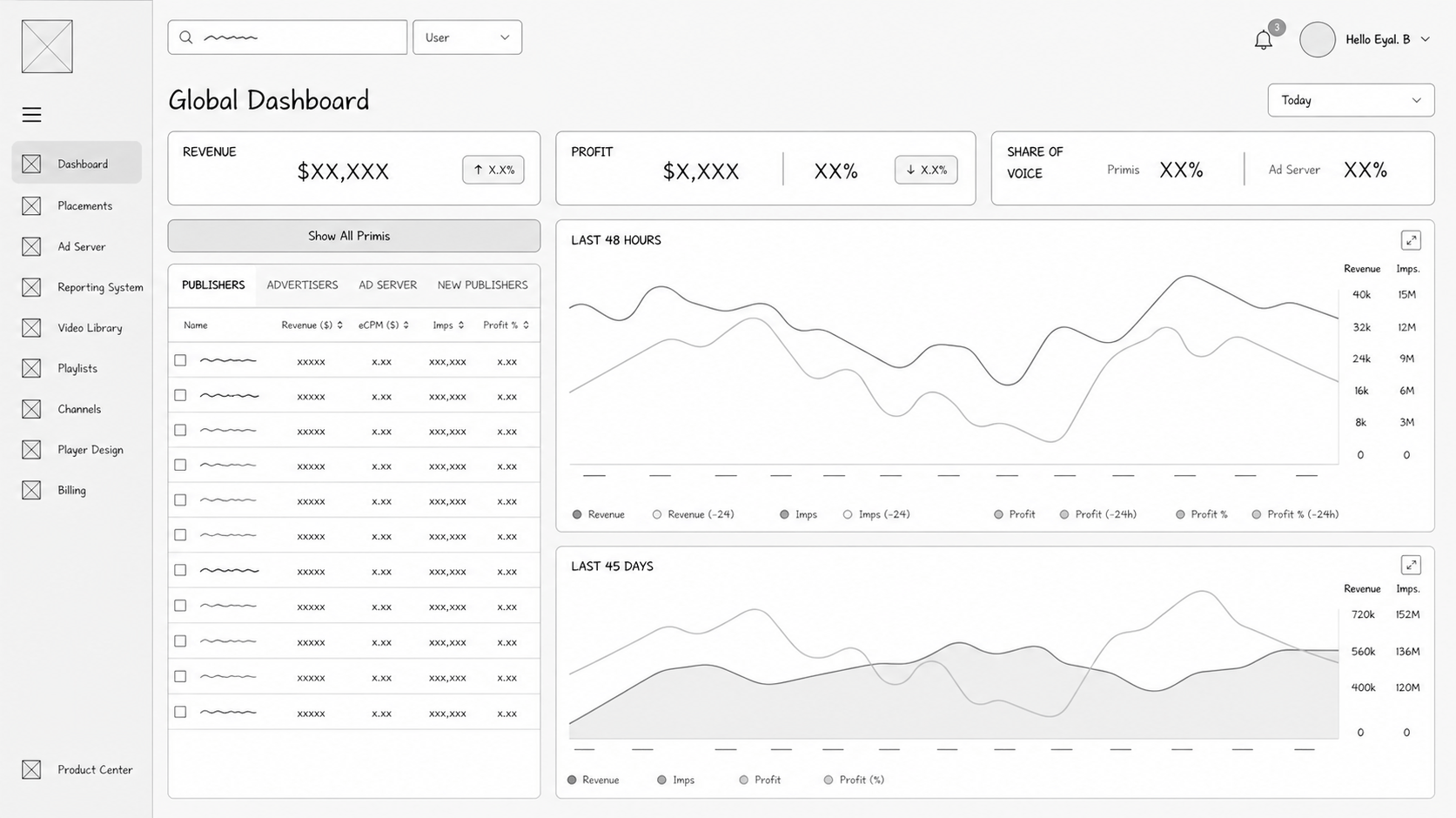
Final Dashboard
Publisher Dashboard – Vision, Ideation & Creation
Research
1) Persona‑Driven Discovery
Conducted 1:1 interviews with Primis clients (publishers, syndicators, hybrid roles).
Captured detailed needs for each persona: what questions they ask daily, what actions they take, and how they interpret data.
I consolidated 4 persona needs:
Publisher: trend lines for revenue and content performance, alert signals for declining metrics, ability to bookmark reports.
Advertiser: pacing controls, spend efficiency over time, placement quality metrics.
Syndicator: comparative analysis across channels, syndicated revenue share, partner contribution variance.
Publisher-Syndicator (Hybrid Role): For publishers that also perform as Syndicators of their own inventory.
2) Task & Context Mapping
Provided prototype dashboards with real anonymized datasets and asked users to complete critical tasks (e.g., find revenue of the last quarter, show/hide data).
Measured time on task, accuracy, and confusion points.
3) Competitive Benchmark & Best Practices Audit
Mapped how top BI and analytics dashboards (Looker, Tableau embeds, PubMatic, Magnite, etc.) structure publisher‑centric data, highlighting best practices in KPI grouping and layout.
4) Role Variation Framework
Defined a role adaptation matrix mapping which widgets, comparisons, and filters each role needs.
Recorded exceptions where data overlaps roles (e.g., a hybrid who needs both publisher breakdowns and syndication data).
Core Insights
Publishers care about directionality (is performance improving consistently?) more than raw numbers. Trends with annotations (change %, signal flags) are more actionable than static KPIs.
Role noise kills clarity: dashboards must collapse unused panels but still allow optional expansion.
What this research informed
Dashboard auto‑configuration per role with dynamic visibility rules for widgets.
Built‑in mentoring hints and tooltips explaining metric definitions.
Visual design patterns that scale from top‑line trends to specific breakdowns without clutter.
Research Summary
Method (interviews, observation, benchmarks)
Participants: Admins/A. Managers, Publishers, Syndicators, Hybrid Roles
Key metrics or patterns discovered
Admins/A. Managers seek an overall granulated view, while publishers seek performance insights
Actionable Insight
Users lacked trend context before filtering
Time selectors were ignored because they were not clear enough
Publishers wanted narrative comparisons (yesterday vs last month) more than static numbers
Solution
The goal was to equip each publisher with a dedicated dashboard that surfaces aggregated performance data, while enabling deep, granular exploration for better decision-making.
I designed role-based dashboards to surface the most relevant data for each user type, reducing noise and improving clarity.
Each role was provided with a tailored level of data granularity, context, and available actions to support their specific workflows.
It also enabled faster onboarding of new features and reduced inconsistencies across the platform as it continued to grow.
To support multiple data components displayed on these graphs, I also used the interactive legend here, instead of a passive indicator, so users can add/remove data metrics and expand/shrink the graph according to their metrics display selection, instantly updating the visualization. Each selected metric is rendered with its own Y-axis scale, allowing accurate comparison of values across different ranges without compromising readability.
As for the user roles, the dashboard automatically adapts its data modules, table structures, and KPIs based on the logged-in role. In practice, this means that certain widgets and data blocks appear only when they are relevant to that specific user type. For example, advertisers will not see syndication metrics, and syndicators will not see publisher-only content breakdowns. To keep the interface flexible without overwhelming users, each dashboard section’s controls are displayed/hidden according to the logged-in persona. The result is a single dashboard framework that stays consistent across the platform while still accounting for the functional differences between publisher, advertiser, syndicator, and hybrid roles.
This approach maintained a consistent system foundation while reducing role-based noise and improving clarity, relevance, and confidence in daily operations.
Impact
Improved clarity in complex workflows.
Reduced cognitive load across key user journeys.
Enabled faster and more confident decision-making.
Reduced operational friction in publisher campaign management
Ideation Wire-Frame
Final Dashboard
Publisher with Syndication Data Vs. Publisher Lacking Syndication Data
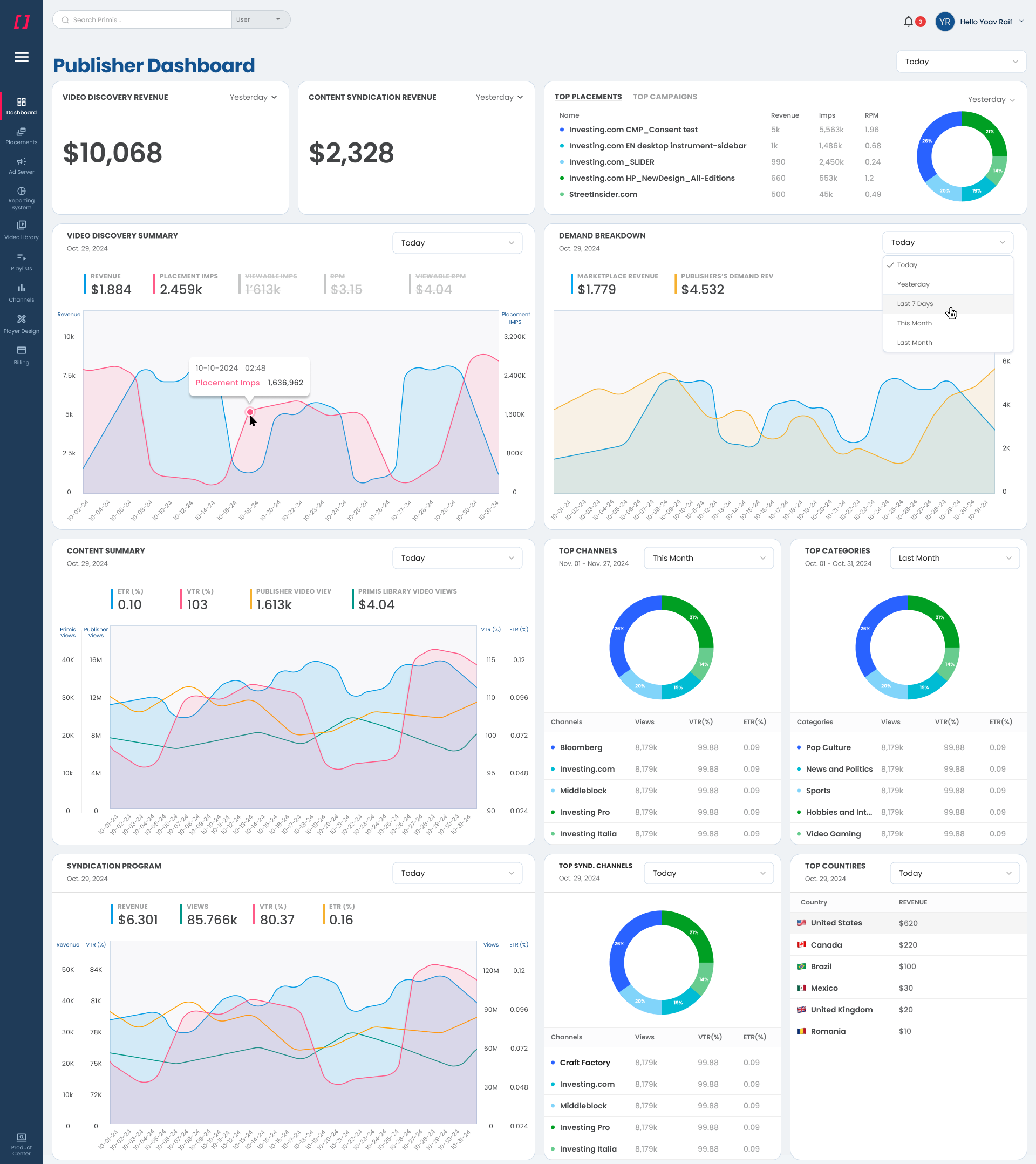
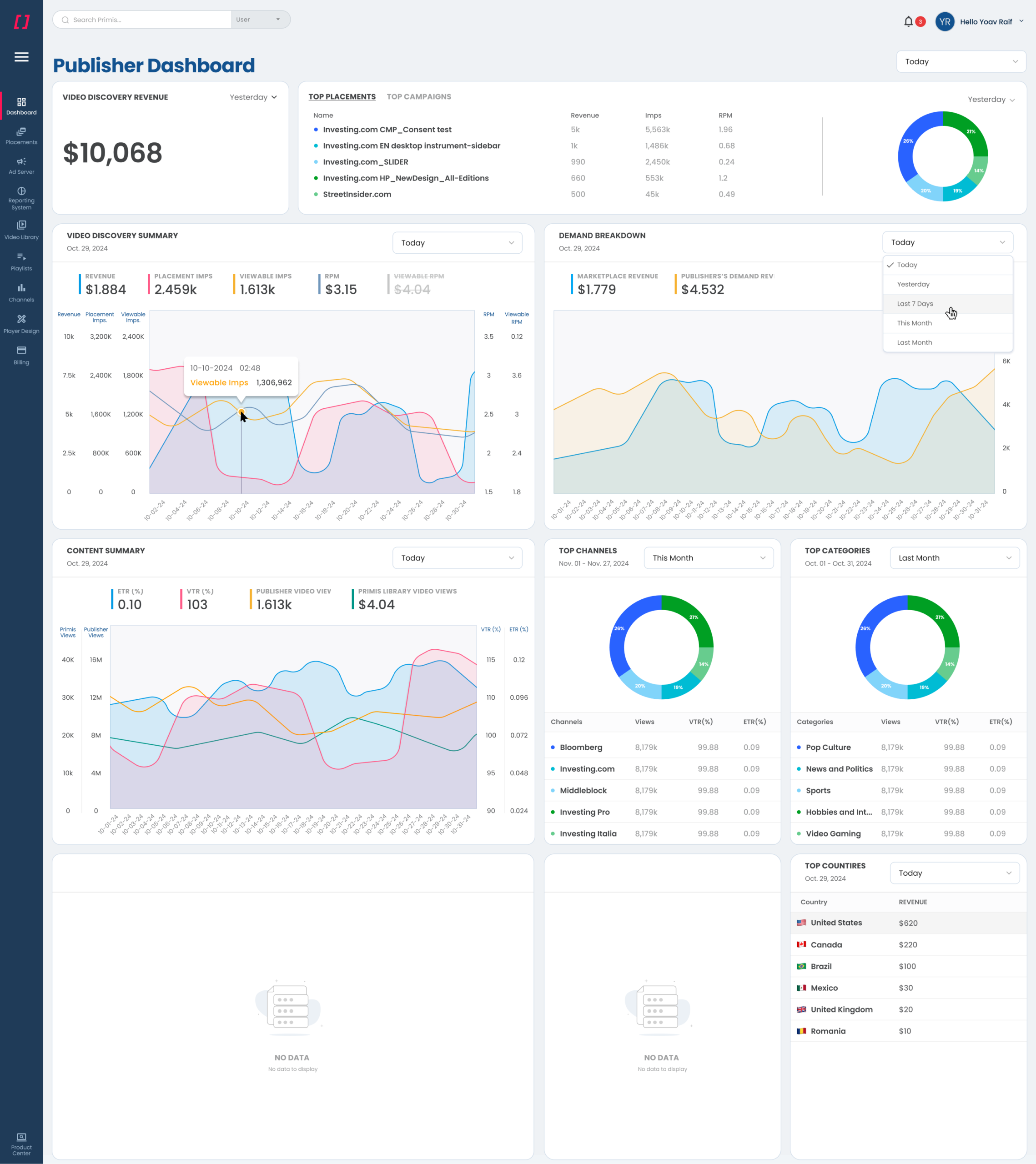
Publisher Vs. Syndicator Layout